
CDK Global: Command-Line to GUI
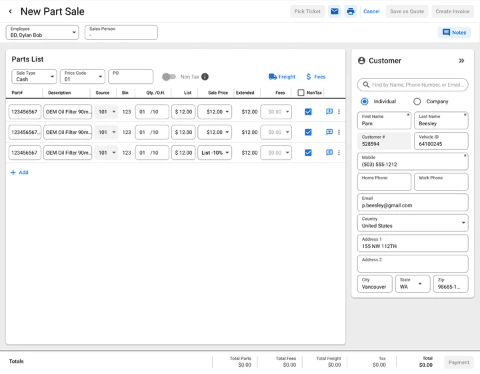
Front counter part sales
Business Challenge
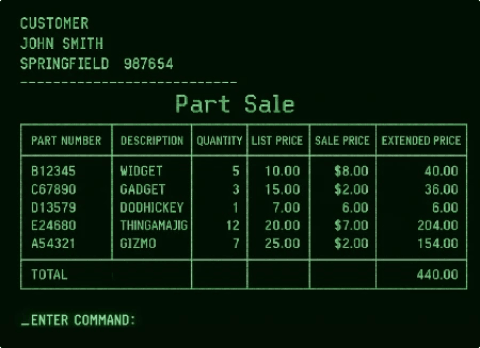
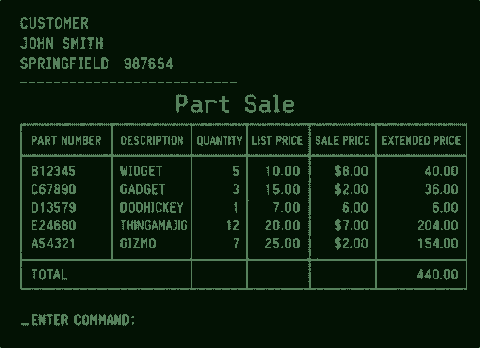
CDK Global provides dealer management software used by automotive dealerships to run sales, service and parts operations. The existing front counter sales process relies on a text-based command line interface that requires users to have significant system knowledge and execute multiple separate functions to complete a transaction.
Key challenges:
- Modernizing the workflow by transitioning from a command line interface to a graphical user interface (GUI).
- Maintaining functional parity and synchronization with legacy software. This limited potential workflow enhancements.
- Supporting existing dealer business processes where feasible.
- Streamlining and optimizing the workflow with a focus on learnability.
Approach
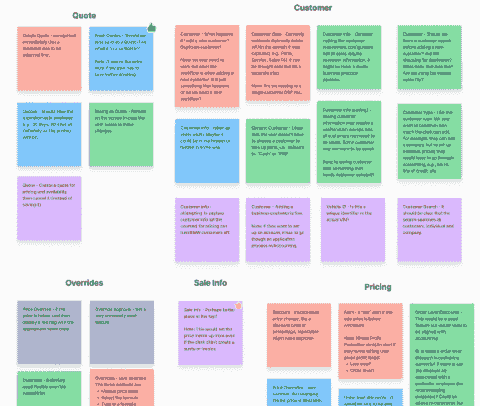
We partnered with parts managers and clerks to understand their daily activities. The dealership environment is often fast-paced and chaotic, with parts personnel splitting their time between sourcing parts for repair orders, fielding calls, and managing counter sales.
My approach included:
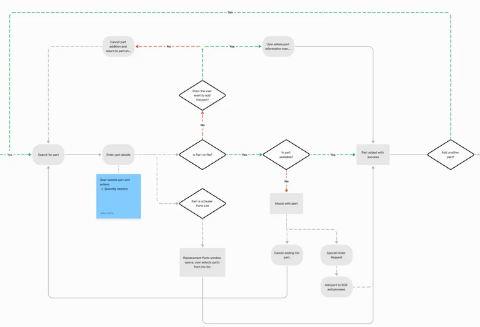
- Learning and documenting the existing front counter sales process (noting that processes varied between dealerships).
- Identifying key pain points and benefits of the existing workflow(s).
- Introducing workflow concepts and collecting user feedback to inform design decisions.
Process
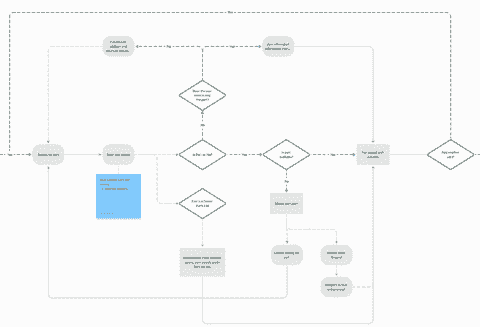
Engaging directly with users was essential to identify improvement opportunities. While system parity provided a starting point, the existing command line system was difficult to learn and disjointed. Solutions needed to meet existing needs and pave the way for future enhancements.
Discovery
• Interviewed parts users and internal SMEs at multiple dealerships; observed them building part orders.
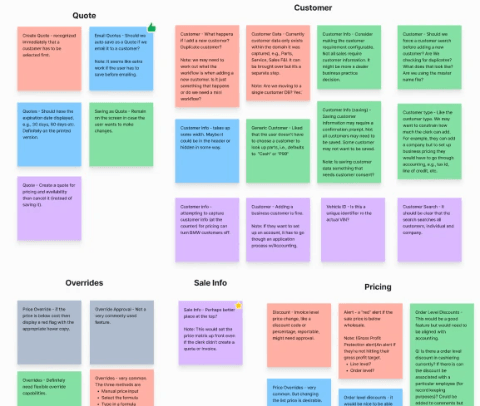
• Consolidated and prioritized research findings into actionable features.
• Refined workflow requirements based on legacy parity and user research.
Design
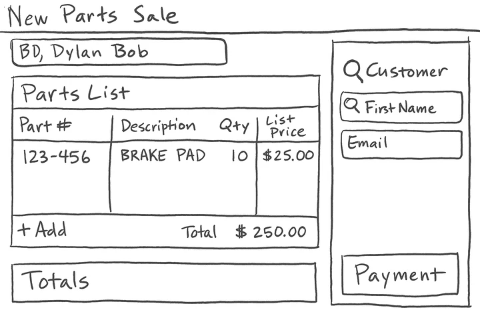
• Developed a modernized workflow addressing high-value pain points.
• Implemented strategies to create a cohesive and easily learnable experience.
Test & Refactor
• Built prototypes to validate design choices through user testing and developer feedback.
• Tested new workflow with partner dealerships.
• Applied findings to refine the design.
Deliver
• Created developer-ready documentation for implementation.
Key Findings
- Business processes differ significantly between dealerships. There is no single “correct” way to use the legacy workflow—dealers often adapt functions to fit their specific needs.
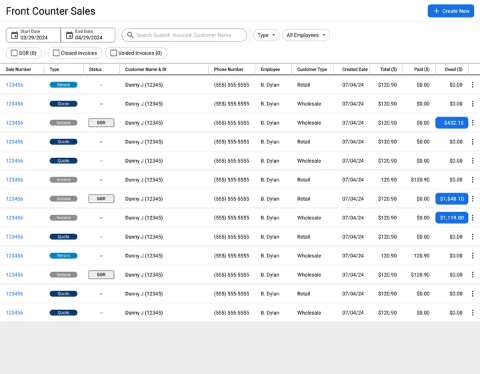
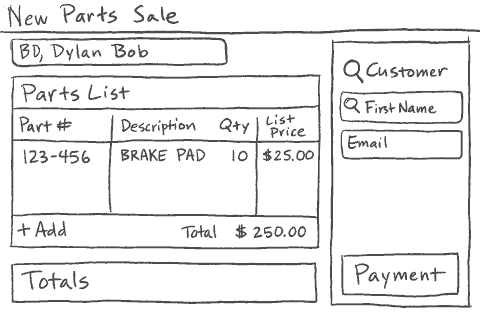
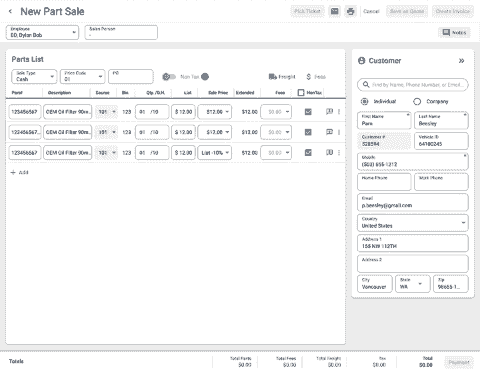
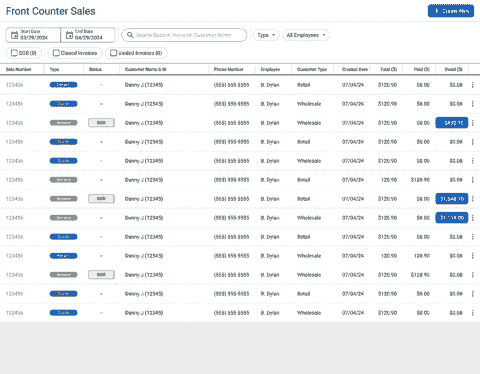
- Created a “dashboard” view for saved quotes and invoices, allowing quick access to both current and completed transactions.
- Reduced data noise from incomplete quotes by requiring customer information. Improved searchability, filtering and sorting.
- Introduced a familiar e-commerce transaction pattern, treating an order as a “cart” that leads to the payment step.
Results
Prototype feedback confirmed that the new design aligned with user needs and business goals. The design was approved and is currently in development.
Key outcomes:
- Delivered a robust, searchable dashboard capable of expansion to include departmental KPIs and data visualizations.
- Developed a modernized workflow that supports multiple paths, accommodating varied dealer business practices.
- Designed a responsive workspace that can be adapted for tablet use. (Tablets in this environment were an edge case.)
Reflection
- Recruiting partner dealerships for testing proved challenging. While participants readily shared feedback, scheduling dedicated time for testing was often difficult. Building strong, long-term relationships with customers and partners is essential.
- Obtaining consistent directional data was difficult due to varying definitions of a “typical” process. Focusing on workflow goals rather than trying to accommodate every variation was key to progress.
- Learning the old command line workflow was complex. The redesigned workflow mirrors familiar e-commerce patterns, requiring minimal training.
- Managers now have quick access to current transactional data without running separate reports. This functionality can be expanded in future iterations.
Front Counter Sales - Gallery
Detailed views


Guitar Center: Checkout Usability Study
E-commerce checkout workflow
Business Challenge
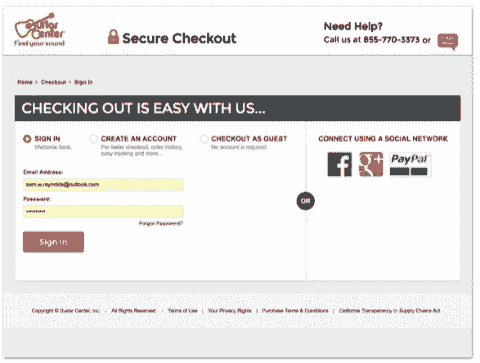
Guitar Center is a musical instrument and equipment retailer operating online and across five brands. The checkout process is one of the most critical areas in any eCommerce experience. While there were many internal opinions on where improvements should be made, concrete usability data was lacking. I initiated a third-party moderated usability study to benchmark our checkout experience and better understand user behavior. Our goal was to ensure that any enhancements were based on validated user data, not assumptions.
Key challenges:
- Secure stakeholder and budget approval for external usability testing.
- Research and engage a reputable and cost-effective testing partner.
- Develop and manage the testing plan & schedule.
- Gather data to replace anecdotal feedback.
- Identify which parts of the checkout truly needed optimization.
Approach
Rather than focus solely on internal evaluation (heuristics), we benchmarked Guitar Center’s checkout against a best-in-class competitor: Walmart. This comparative approach provided a reference point for usability expectations and performance standards.
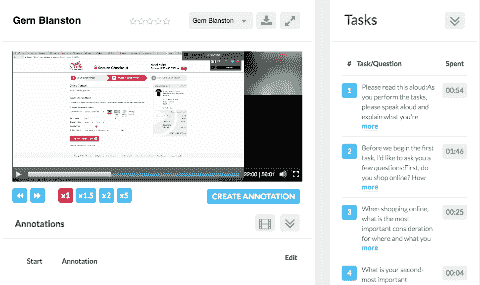
Our usability testing partner conducted moderated sessions on both desktop and mobile, using live screen-sharing and recorded video to capture the user experience in detail.
Study Goals
- Identify strengths and weaknesses within Guitar Center’s checkout workflow.
- Compare performance and user satisfaction against another leading online retailer.
Process
We conducted 20 moderated usability sessions:
- 10 mobile participants
- 10 desktop participants
Each participant:
- Had made a music-related online purchase within the last year.
- Was either a musician or had shopped for musicians.
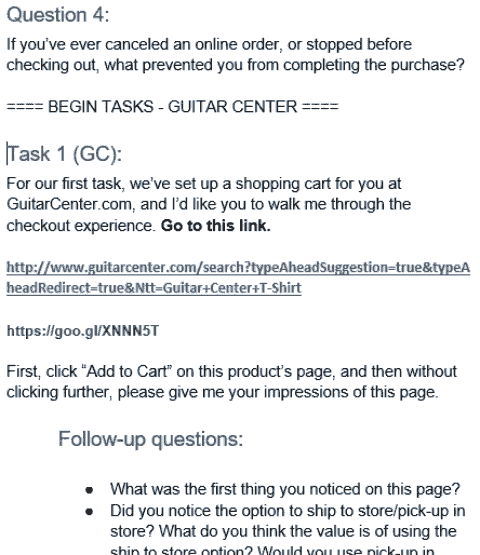
- Was asked to add a pre-selected item to the cart and complete checkout using a provided coupon code.
Each 1-hour session was recorded and moderated, with follow-up questions asked after each checkout step. Participants completed both Guitar Center’s and Walmart’s checkout experiences in sequence.
Key Findings
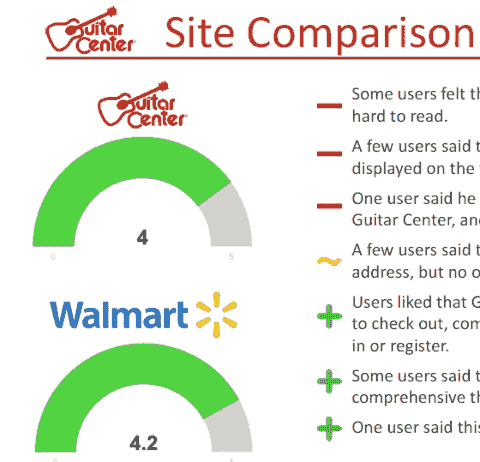
Overall performance: Guitar Center’s checkout compared favorably with the benchmark.
- Desktop scored slightly lower.
- Mobile scored slightly higher.
Highlights
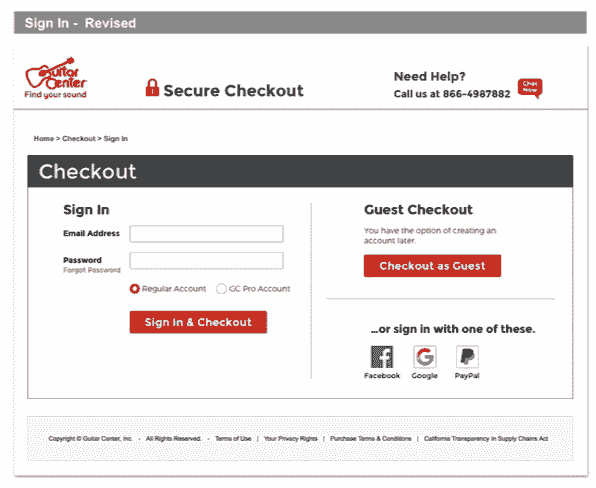
- Guest Checkout: Users appreciated having this option readily available.
- Pick-Up in Store: This feature was consistently viewed as a valuable and convenient choice.
- Perception: One participant commented that the experience “felt better than Amazon’s.”
These results provided strong validation that Guitar Center’s checkout process met user expectations and performed well relative to competitors.
Results
The study revealed that the core checkout workflow was solid, requiring refinement rather than redesign. Improvement opportunities focused on optimization and efficiency enhancements rather than structural changes.
Next Steps
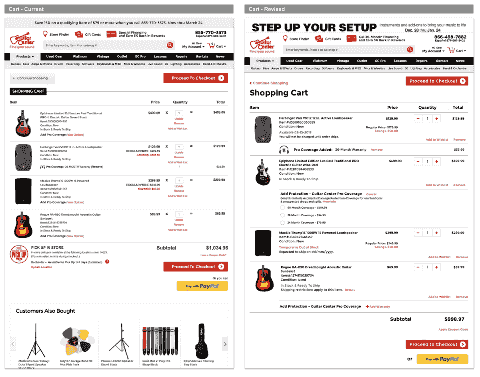
- Develop and execute an A/B testing plan targeting checkout sign-in flow and cart layout and order summary patterns.
- Implement form optimizations such as zip code-based city/state prefill.
- Streamline the payment workflow, e.g., selecting payment, multiple payment types, etc..
- Ensure parallel user experiences between desktop and mobile environments.
Reflection
The checkout usability study clearly demonstrated the value of structured, comprehensive usability research. The research confirmed that even well-performing workflows can benefit from targeted optimization, a valuable insight for ongoing digital improvements.
- Provided data-driven clarity on which checkout areas to prioritize.
- Replaced subjective opinions with user-validated insights.
- Demonstrated that Guitar Center’s checkout process aligned closely with leading retail benchmarks.
- Created a foundation for measurable, iterative A/B testing and optimization.
Gallery
Detailed views

Start checkout

Shopping cart

Payment
Amgen: Mobile Room Finder
Conference Room Finder - This project demonstrates my ability to navigate ambiguity, technical constraints, and complex enterprise environments.
Business Challenges
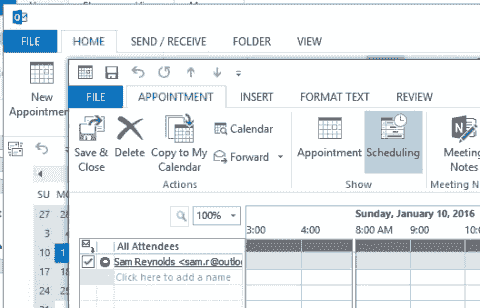
Amgen, a global biotechnology company, required meeting room scheduling through Microsoft Outlook, which presented significant usability barriers, especially on mobile devices. The room booking process was slow, network-dependent, and cumbersome, particularly when away from their desks or off the corporate VPN.
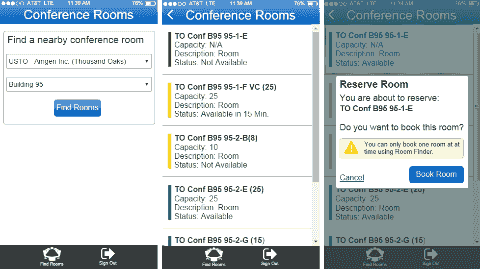
The goal was to design and develop a complementary mobile application (not an Outlook replacement) that was easier and faster to reserve meeting rooms across Amgen’s geographically dispersed locations.
- Required a laptop or tablet running Outlook connected to the corporate network.
- Connect via VPN when working remotely.
- Search manually through numerous buildings and rooms to locate available spaces.
The challenge was to create a simple, focused mobile app that allowed users to:
- Find available rooms quickly.
- Book rooms without needing to log in through Outlook or VPN.
- Complement, rather than duplicate, Outlook functionality.
Approach
From Agile Workshop to Working Product
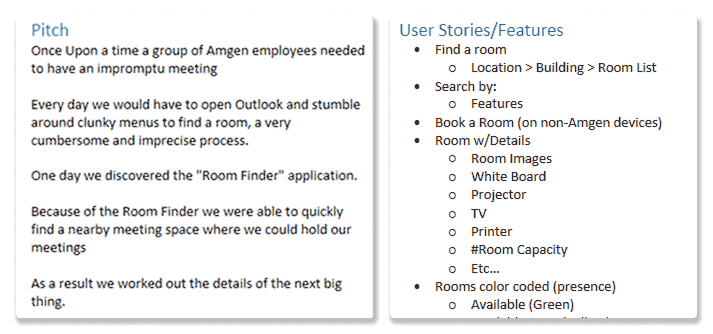
The Room Finder app originated as an Agile workshop prototype that evolved into a full development initiative. The design and development approach emphasized iteration, simplicity, and accessibility:
- Avoid duplication: The app was designed only for discovering and reserving rooms, not managing calendar events.
- Off-network access: Ensure functionality without requiring VPN or corporate Wi-Fi.
- Platform focus: Target iOS devices only, Amgen’s corporate standard.
- Holistic design: Balance functionality, usability, and visual clarity.
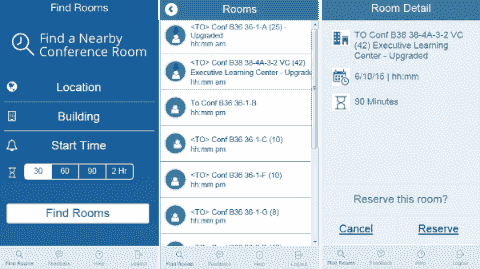
- Rapid prototyping: Used Axure for workflow visualization, interaction models, and interface testing.
- Frequent iteration: Internal stakeholders provided continuous feedback throughout each design cycle.
- MVP-first mindset: Prioritize core functionality, release early, and refine through real user feedback.
Process
The project presented significant technical and organizational challenges:
- The team had limited mobile development experience and no prior iOS expertise.
- Budget constraints limited the number of available resources.
- Amgen’s infrastructure had minimal mobile app support, aside from MDM (Mobile Device Management).
- Off-premise access and technical support were new and required innovative workarounds.
Key Findings
Within weeks of development starting, the team had a working MVP. Testing relied on internal colleagues using the app, reporting bugs, and providing usability feedback. Issues were prioritized and addressed iteratively.
- A simple, focused smartphone design simplified development and reduced technical risk.
- Deep knowledge of internal systems enabled efficient integration with existing web services.
- A talented visual designer created assets compatible with iOS requirements, despite limited iOS background.
- A dedicated iOS developer was brought in, learning on the job. Progress was slow but steady.
- Testing was challenging without QA resources; ad-hoc internal testing filled this gap.
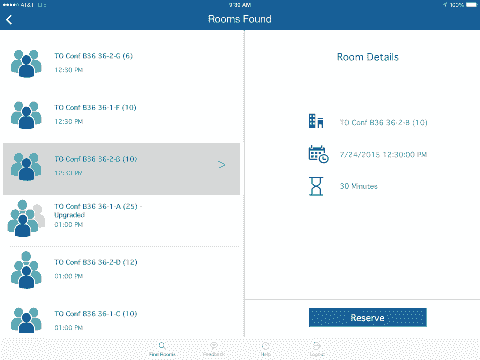
- Late iPad extension: Expanding to iPad late in the process introduced risk but produced positive results.
Results
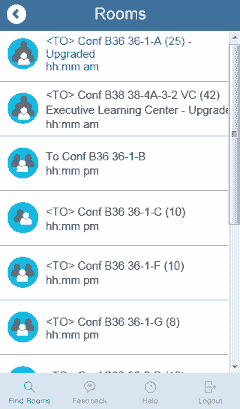
Once stable, the Room Finder app rolled out in multiple phases, with UI improvements added after each release.
- 500+ downloads in a single region, significant for an organization with no prior in-house mobile app history.
- Positive employee feedback collected through in-app comments, primarily requesting additional features.
- Room reservation data tracked to assess real-world usage and adoption trends.
The combination of user feedback and measurable engagement demonstrated strong demand for mobile productivity tools within the organization.
Reflection
The Room Finder project was a clear success both from a design and adoption perspective. Despite limited experience, tight resources, and technical constraints, the team produced a stable, user-friendly mobile solution that directly addressed employee pain points.
The key takeaways:
- Start small, iterate often: Rapid prototyping and internal testing were critical to progress.
- Keep scope focused: Limiting functionality to the essential “find and reserve” workflow simplified both design and development.
- Design for constraints: iOS-only deployment streamlined decisions and testing.
- Build organizational confidence: The project paved the way for future internal mobile development efforts at Amgen.
The Room Finder app demonstrated that even within enterprise constraints, a small, agile team can deliver meaningful user-centered solutions with measurable business impact.
Room Finder Gallery
Detailed views


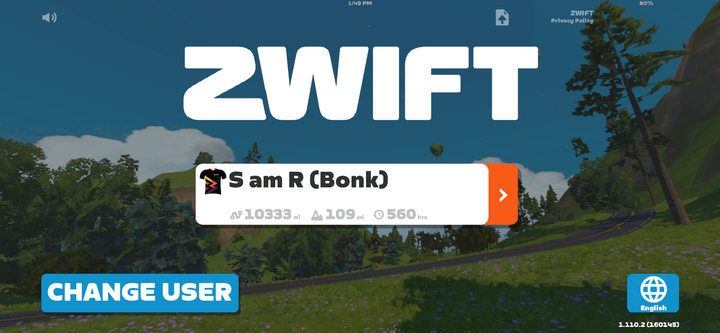
Zwift Companion App
Personal Side Project - Demo
Business Challenge
Zwift is a well-established app with a stable, loyal user base. Like any mature product, familiarity breeds comfort and trust — which means even obvious improvements carry some element of risk. Additionally, working outside the organization meant I had no access to actual usage data, requiring me to rely on publicly available information, general user feedback, and my own experience as a rider and designer.
Platform context:
- Well-established app with a stable user base
- Broadly solid cycling and running activities spanning solo, group, and competitive formats
- Cross-platform support
Research constraints:
- No usage metrics
- Limited access to user feedback
- Personal bias as both a cyclist and UX designer
Note: This isn't intended as a visual design exercise. I focused on functionality, and leveraged Claude and Loveable to create a unique look and feel and generate a partially interactive prototype.
Approach
Informal Survey and Personal Experience
Since I didn't have access to app data, I conducted an informal survey of fellow cyclists — members of my bike club and a few close riding friends. I asked three open-ended questions:
- What do you like about the app?
- What don't you like about the app?
- What new features would you add?
This approach was intentionally open-ended to avoid leading responses. It produced a wide range of feedback, which was both an asset and a challenge to synthesize.
Process
Analyzing the Responses
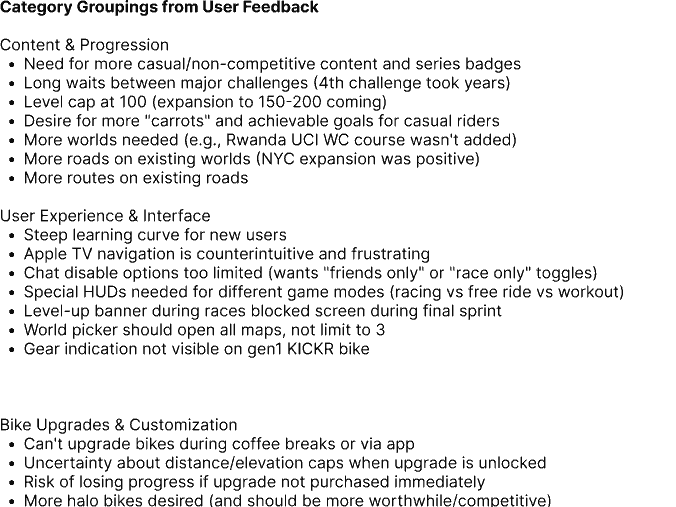
Response volume was modest, but the quality was substantial. Feedback covered a wide range of topics — data analysis, data access, training plans, event types, and Garage management. For the purposes of this project, I scoped the work to UI-level changes. Broader opportunities around data gamification and content expansion remain interesting territory for a future case study.
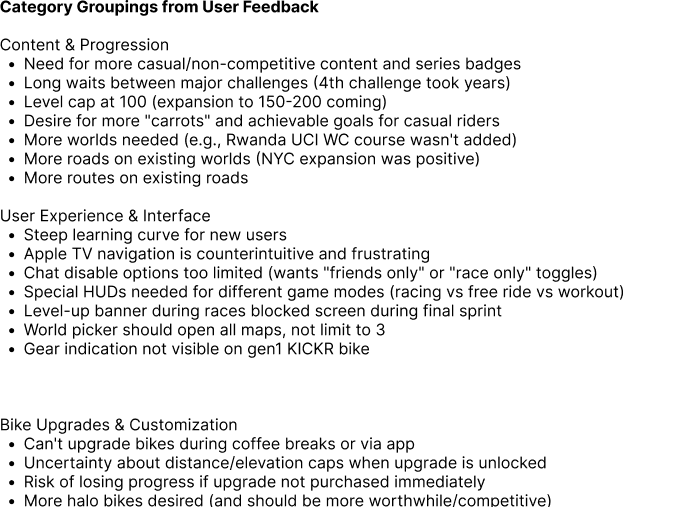
To make sense of the qualitative data, I used ChatGPT to assist with categorization:
- Started with AI-generated categories
- Manually extended and refined those categories based on emerging themes
- Settled on a core group of enhancements that felt achievable and meaningful
- Selected a focused subset for an interactive demo
Key Findings
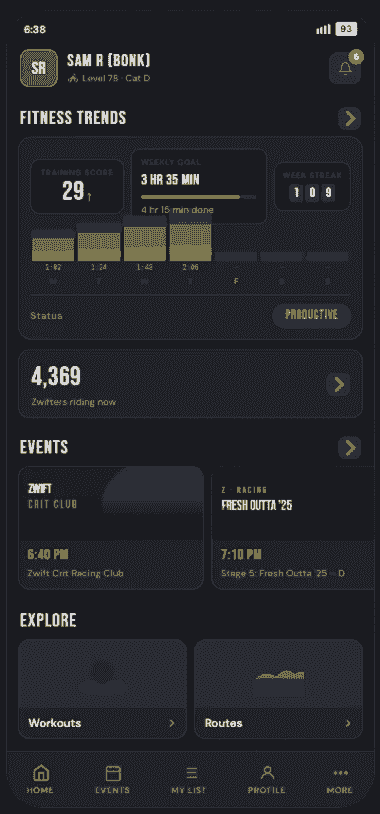
Based on the analysis I was able to reduce the scope to the following:
- Garage management
- Companion app experience
- Route navigation
- Chat features
- Apple TV user experience
- Profile management
To further reduce scope, I focused on the Companion App. Features addressed included:
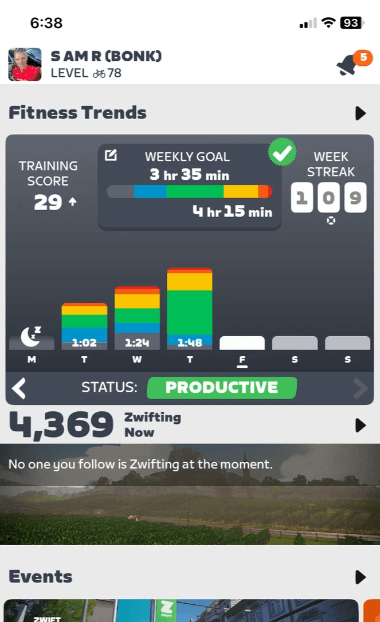
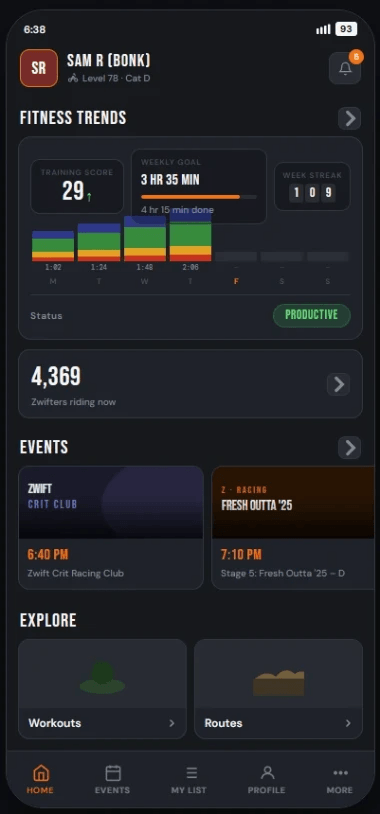
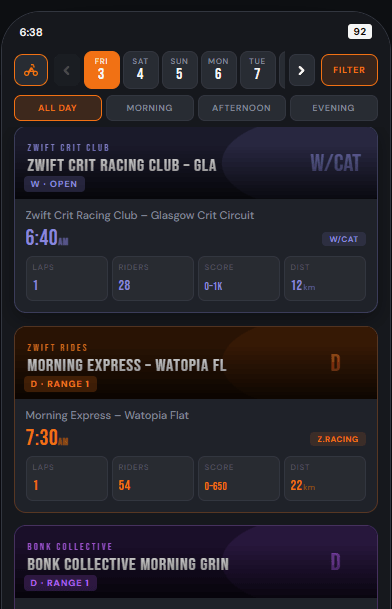
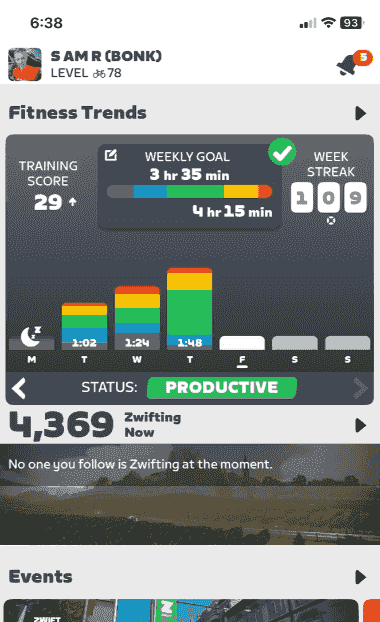
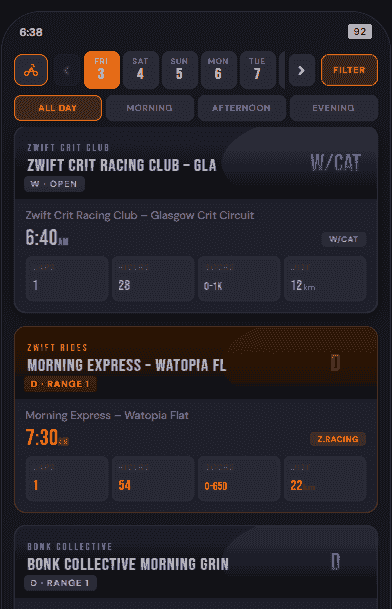
- General look and feel — The current layout and color scheme causes event tiles to visually blend together, making it difficult to scan and differentiate between events. The overall aesthetic skews blocky with heavy primary colors.
- Day/time selection — Endless scrolling to locate events later in the day is a significant friction point for regular users.
- Footer navigation — Could be refocused around daily-relevant information. Clubs is a useful feature, but it doesn't reflect how most users spend their time in the app.
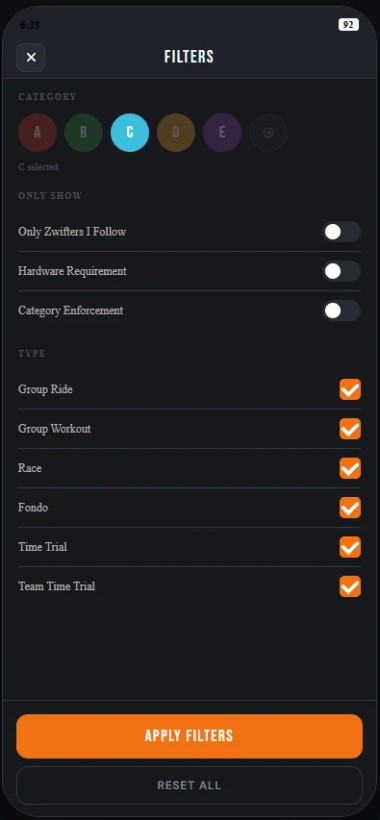
- Filters — Functional, but the interaction pattern feels clunky and could be streamlined.
Results
Design and Development Using Claude AI
I had initially planned to use Figma as my primary design tool, but the emerging design-to-code workflow looked worth exploring — so I used Claude AI to execute on my findings. Drawing from the existing app and visual direction work I had developed in Lovable, I prompted Claude with my requirements. The output was strong enough to clearly communicate design direction and interactive functionality.
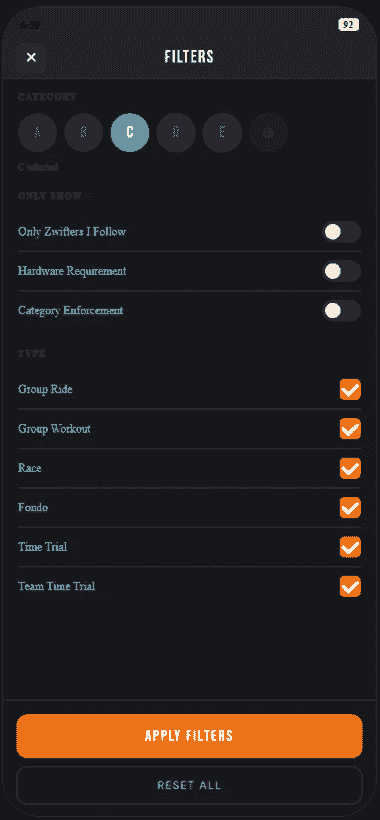
- Generated a more distinctive visual language that provides a concrete discussion starting point for potential enhancements
- Focused the footer navigation on options more relevant to daily use
- Modeled an improved date and time selection method that makes finding events faster and more intuitive
- Refined the filtering UI to make selecting event levels (A, B, C, etc.) and related categories more straightforward
Reminder: This is a proof-of-concept prototype, not a production-ready build. It's designed to model specific interactions and demonstrate what's achievable with modern design-to-code tools.
Reflection
As a Zwift user, I'm obviously not a neutral observer — I already enjoy the app, and watching it evolve over the years has been genuinely exciting. That personal investment made this project more meaningful, but it also reinforced the importance of actively seeking outside perspectives.
Key takeaways:
- Different perspectives — The range of responses was broader than expected. Casual users focused primarily on aesthetics and ease of use, while more serious riders prioritized performance data and workflow efficiency.
- Small changes, meaningful impact — Enhancements need to be prioritized carefully. Something as simple as improving day and time selection can have an outsized effect on daily usability.
- User types matter — Zwift's subscriber base spans a wide spectrum of ability and intent. Adding robust training features, for example, may resonate with competitive riders but do little to retain casual users. Any enhancement should be weighed against its impact across the full audience.
Overall, the demo accomplished what it set out to do — model potential UX improvements in a concrete, discussable format while demonstrating the practical value of AI-assisted design workflows.
Musings
My thoughts about UX and other stuff
AI and the "Why"
April 14, 2026
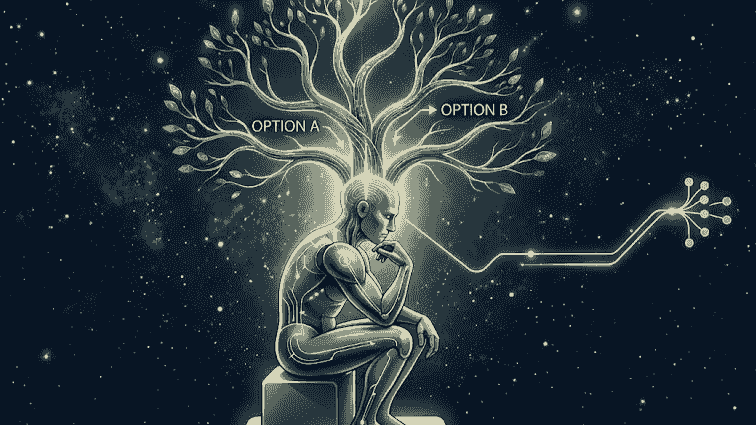
Design has always evolved alongside the tools. CSS changed how we thought about visual structure. Platforms like Drupal changed how teams managed content. Frameworks like Bootstrap made consistency achievable at scale. Each of these technologies made product development faster, but they shared one requirement: you had to understand them deeply to use them well. AI is the next major tooling shift, and it raises a question. What happens when the tool does the thinking for you?
Describing what you want is a fundamentally different skill than actually designing/building it. AI makes that distinction matter less, at least on the surface. You can describe a need, feed it into a tool, and get something clickable, maybe even shippable, without drawing a single wireframe or writing a line of code. That's genuinely powerful. But it's worth asking what gets lost in that transaction.
The public conversation about AI tends to land in one of two camps. Either the robots are coming for everyone's jobs, or the people who use AI will replace the people who don't. Both framings have some truth to them. But there's a third question that gets less attention. How do we know the AI is giving us good work? AI operates on pattern recognition. It draws from what it has learned and produces outputs that fit the shape of a solution. It doesn't have expertise so much as it has fluency. It can look right without being right.
The practical risk shows up fast. Jacob Dilley posted about an AI-generated creative brief that looked polished and complete. When the client started asking questions, nobody could answer them. The choices looked well-considered but the reasoning behind them was missing. You could reverse-engineer the output after the fact, but if you have to re-educate yourself on your own deliverable every time, the efficiency argument starts to fall apart.
Here's a concrete design example. You need to design a complex customer-facing sales workflow, product lookup, subtotals, discounts, payment, etc. You plug the requirements into your AI tool of choice and get a fully interactive design that might even be production-ready. You bring it to a design review and someone asks why you used one pattern instead of another. You realize you can't answer. You didn't work through the problem, so you can't speak to the tradeoffs. Call it the black box problem. Requirements go in, designs come out, and the thinking behind the designs is invisible.
This connects to something else worth examining: the idea that UX designers shouldn't be "pixel pushers." There's a longer conversation to be had about visual design, portfolios, and design systems, but let's stay focused on functional and workflow design. The act of drawing boxes and arrows is part of how designers develop understanding. You sketch something, test it, and change it. By the time you've iterated through several approaches, you know why one works better than another. That process is where the expertise lives. AI compresses or skips that process entirely, and when it does, the designer loses the thread. If we let the tool do all the work, we run the risk of becoming bystanders in our own output.
So where does that leave us? AI tools are not going away, and there are genuinely good uses for them. Analyzing research transcripts and interview notes is tedious work, and AI handles it reasonably well. Iterating on wireframe concepts early in the process can accelerate exploration. Prototyping with realistic data and interactions is a significant win for teams that need to communicate ideas quickly. These are areas where AI supports the work without replacing the judgment behind it.
The places to be more careful are the ones that involve consequential decisions. Design-to-production-code workflows, for instance, carry real risk without expert review. Polished AI output can look authoritative even when it's built on shaky assumptions. The question to keep asking, regardless of which tools you use, is whether you can explain why you made the choices you made. If you can't answer that question, it's worth pausing before you commit.